
Interaction strategies
Use behavioral data to find products that customers frequently interact with together. Interaction data is computed periodically based on historical events.Frequently Bought Together
Frequently Bought Together
Products that are frequently purchased together in the same order.Supported anchors: Product, CartUse cases:
- Product page: “Customers who bought this also bought…”
- Cart: “Complete your purchase with these items”
Customers Also Viewed
Customers Also Viewed
Products that are frequently viewed together in the same browsing session.Supported anchors: Product, CartUse cases:
- Product page: “Customers also viewed these products”
- Browse abandonment recovery
Customers Also Added to Cart
Customers Also Added to Cart
Products that are frequently added to cart together in the same session.Supported anchors: Product, CartUse cases:
- Product page: “Often added together”
- Cart optimization
Viewed Then Bought
Viewed Then Bought
Products that customers purchased after viewing a specific product in the same session. Viewed Then Bought connects browsing behavior with purchase intent: it surfaces products that shoppers who viewed the anchor product went on to buy.Supported anchors: Product, CartUse cases:
- Product page: “Customers who viewed this ultimately bought…”
- Conversion-focused recommendations
- Identifying high-intent product pairings
Customers Who Viewed Then Viewed
Customers Who Viewed Then Viewed
Products that customers viewed shortly after viewing the anchor product in the same session. Unlike “Customers Also Viewed” (which considers any two views in the same session), this strategy is directional and only counts products viewed within the next few events after the anchor. Recommendations reflect what shoppers naturally clicked into next.Supported anchors: Product, CartUse cases:
- Product page: “Shoppers viewed next”
- Guiding shoppers through a browse path
- Surfacing tightly related follow-on views
Customers Who Bought Also Bought
Customers Who Bought Also Bought
Products that customers who bought a specific product also purchased across any of their orders. Unlike “Frequently Bought Together” (which looks at products in the same order), this strategy looks at a customer’s entire purchase history to find broader buying patterns.Supported anchors: Product, CartUse cases:
- Product page: “Customers who bought this also bought…”
- Long-term cross-sell recommendations
- Discovering complementary products across separate orders
Interaction strategies require sufficient historical data to generate meaningful recommendations. While strategy data is being computed, blocks using interaction strategies automatically return empty results and defer to their fallback chain. The API response includes a
_training flag during this period.How interaction results are ranked
Layers ranks each recommendation by lift: how much more likely shoppers are to interact with the product after the anchor than they are in general. Recent events carry more weight than older ones. Layers pulls scores for pairings with only a handful of interactions toward their category average. A pairing seen 40 times across 100 anchor sessions therefore outranks one seen twice across two sessions. Ranking also accounts for the anchor’s product category:- Category backoff. By default, when an anchor has little or no interaction history of its own (for example, a newly added product), Layers fills the block with the top products for the anchor’s product category, then its parent category. These results always rank below results computed from the anchor’s own history, and the anchor itself is never recommended. You can turn this off for an individual block.
- Same-category demotion. The purchase-driven recipes (Frequently Bought Together, Viewed Then Bought, and Customers Who Bought Also Bought) demote recommendations from the anchor’s own category below cross-category matches. The block favors products that go with the anchor over alternatives to it.
blocks-catalog tool returns it per strategy key.
Blocks order by lift by default. Change the Order by strategy setting to keep ordering by raw co-occurrence instead. See Interaction ordering.
Choose whether to fill from category history
Product- and cart-anchored interaction strategies have a Fill with category co-purchases setting in the block editor. It is on by default, so existing blocks keep their current behavior.- Leave it on when you want recommendations for products with little history, using related category activity to fill gaps.
- Turn it off when recommendations should come only from the anchor products’ own interaction history. The block may return fewer products. If there is no history, it returns no primary results and tries its fallback chain. The minimum products safeguard still applies.
Product families and interaction strategies
When your store has active product families, interaction strategies treat each family as a single product. Without this, near-duplicates inflate the data: eight colorways of the same dress viewed in one session would count as eight products frequently viewed together. With active families:- Behavioral signal from all family members is combined at the family level.
- Products are never recommended alongside another member of their own family, and a family’s members are not recommended for its own anchor products.
- Each family appears as one representative product in results. For families built from combined listings, Layers picks a representative that matches your combined listings display setting. A parent-only store shows the parent listing, and a child-only store shows a child.
Collection interaction strategies
Use behavioral data to find products related to a collection based on how shoppers who browse that collection interact with products. Unlike product interaction strategies (which find product-to-product relationships), collection interaction strategies compute collection-to-product relationships.Browsed Then Bought
Browsed Then Bought
Products frequently purchased by shoppers who browsed the collection.Supported anchors: CollectionUse cases:
- Collection page: “Popular purchases from this collection”
- Cross-sell products based on collection browsing behavior
Browsed Then Viewed
Browsed Then Viewed
Products frequently viewed by shoppers who browsed the collection.Supported anchors: CollectionUse cases:
- Collection page: “Shoppers also viewed these products”
- Discover products related to a collection through browsing patterns
Trending in Collection
Trending in Collection
Products currently trending within the collection based on recent activity.Supported anchors: CollectionUse cases:
- Collection page: “Trending now”
- Surface popular products within a specific collection
Collection interaction strategies require sufficient historical browsing and interaction data. Data is computed periodically based on configured time windows (7d, 30d, 90d).
Similar products strategies
Find products that are visually and semantically similar to a seed. The base Similar Products strategy uses the product on a product page, a representative product from a collection, or the products in a cart. Behavior-seeded variants use products in the shopper’s session, such as recent views, cart, or orders, so recommendations follow real intent instead of the current page alone.Similar Products
Supported anchors: Product, Collection, Cart In the block editor, Similar Products is offered on Product and Collection anchors. Cart anchors in the editor use Visually Similar to Cart instead. You can still configure the base strategy on a Cart anchor through the API or MCP. How it works: Layers indexes each product using its images, title, description, and attributes so it can be matched against other products. It then runs the full ranking pipeline, combining visual and semantic similarity with behavioral signals, and stores the top results for each product in a precomputed cache. When a customer views a product, the block serves results directly from this cache for fast response times. If no precomputed data exists yet, such as for a newly added product, Layers falls back to computing similarity in real time. For collection anchors, Layers automatically selects a representative product from the collection to use as the similarity source. When you use a Cart anchor, Layers combines visual and semantic signals from every product in the shopper’s cart. Variant-aware seeding: For product-anchored blocks, storefronts can pass the currently viewedvariant_id on the Blocks API request. When the variant belongs to the anchor product, the block seeds similarity from that variant rather than the product as a whole. Shoppers on a green shirt then see different recommendations than shoppers on the red one. Variant-seeded requests are computed in real time and bypass the precomputed cache. Requests without variant_id continue to use the cache. If the variant isn’t indexed yet, the block degrades to product-level similarity.
Precomputed results and freshness:
- Results are recomputed daily when the existing data is more than three days old or new products have been added since the last run
- When a product’s content is updated (for example, after editing its title, description, or images), that product’s similar products are recomputed incrementally
- An hourly coverage check finds products that are missing precomputed results, such as products added through a bulk catalog import, and queues them for computation. It also rotates the oldest precomputed results so recommendations stay current as the catalog changes
- Products whose index data isn’t ready yet are retried automatically on the hourly cadence instead of being skipped
- All filters, facets, pagination, and sort orders continue to work as expected on precomputed results
- No configuration is required. Precomputed caching is enabled automatically for stores with active similar products blocks
- Match: recommendations must share a value with the anchor. For an API- or MCP-configured Cart anchor, a value from any cart product can match. Multi-valued attributes (like tags) match any of the anchor’s values.
- Within % band: recommendations must fall within a percentage tolerance of the anchor’s value. For an API- or MCP-configured Cart anchor, the range spans the lowest and highest values across the cart. Band rules are available only for numeric attributes, such as price.
- Constraints filter both precomputed and real-time similarity results. A product that fails a rule is excluded, not just demoted.
- If the anchor has no value for a rule’s attribute, Layers skips that rule rather than emptying the block.
- On collection anchors, rules resolve against the representative product Layers selects for the collection.
- For Cart anchors configured through the API or MCP, Layers resolves rules against every product in the cart. Match rules use the union of their values, and numeric bands span the cart’s minimum and maximum values.
- Layers automatically widens the similarity candidate pool for constrained blocks, so filtering doesn’t starve the block of results.
- If constraints still leave too few products, the minimum products safeguard and fallback chain apply as usual.
- Block preview in the dashboard reflects constraints, so you can verify the effect before publishing.
- “Similar Products” on product pages
- “You May Also Like” recommendations
- Visual discovery and exploration
- Collection-based similarity recommendations
- Category- or price-consistent alternatives (“more dresses like this one, in the same price range”)
Behavior-seeded similarity
Behavior-seeded strategies combine the products the shopper has already interacted with into a single seed profile, then find visually and semantically similar products across your catalog. Products the shopper has already seen, added to cart, or purchased are automatically excluded from the results so they always see something new. Behavior-seeded strategies are accepted on Product, Collection, and Cart anchors. In the block editor, only Visually Similar to Cart is offered, on Cart anchors. Configure the other behavior-seeded strategies, or use them on other anchors, through the API or MCP.Visually Similar to Browsing History
Visually Similar to Browsing History
Recommend products that look like items the shopper has viewed recently in the current session, excluding products they’ve already seen.Supported anchors: Product, Collection, Cart (API and MCP only)Use cases:
- “Because you were browsing…” rail on product pages
- Recovery rail on cart pages
Visually Similar to Cart
Visually Similar to Cart
Recommend products that look like items currently in the shopper’s cart.Supported anchors: Cart in the block editor. Product and Collection through the API or MCP.Use cases:
- “You might also like” rail on the cart page
- Style-matched cross-sell before checkout
Visually Similar to Order History
Visually Similar to Order History
Recommend products that look like items the shopper has purchased in past orders.Supported anchors: Product, Collection, Cart (API and MCP only)Use cases:
- Returning-customer rail on product or cart pages
- Style-continuation recommendations after a repeat visit
Visually Similar to Current Order
Visually Similar to Current Order
Recommend products that look like items the shopper just purchased in the current browsing session.Supported anchors: Product, Collection, Cart (API and MCP only)Use cases:
- Post-purchase “You may also like” rail
- Thank-you page cross-sell
Behavior-seeded similarity strategies require the shopper to have relevant session activity (views, cart items, or orders). When the seed is empty or the seed products aren’t fully indexed yet, the block defers to its fallback chain.
Shop the Article
Recommend products from a blog article. The block returns the products the article links to first, then fills the remaining slots with products that are visually and semantically similar to the article’s content. Supported anchors: Article How it works:- Layers extracts product links from the article’s body:
<a>tags whose path matches/products/{handle}. Linked products appear first, in the order they’re linked, deduplicated. Handles resolve only against your own catalog. - Layers seeds a similarity search from the article’s indexed content and fills the rest of the block with matching products, excluding the linked products.
- Linked products pass through the same eligibility checks as a manual block, so unpublished or channel-restricted products are skipped.
similar_products strategy key available on article anchors. Selecting Similar Products on an article anchor in the block editor maps to the similar_to_article key automatically.
Use cases:
- “Shop this story” rails under a blog post
- Gift guides and lookbooks where the article links the featured products
- Editorial content that should convert without manual curation
Manual strategy
Curate products using a collection or hand-picked product IDs, with optional custom sorting. The manual strategy gives you full control over which products appear in the block. Supported anchors: All anchor types: Product, Article, Collection, Cart, Home, Search, Not Found, Landing, Other, and None The following animation shows how to select the manual strategy to hand-pick which products appear in a block.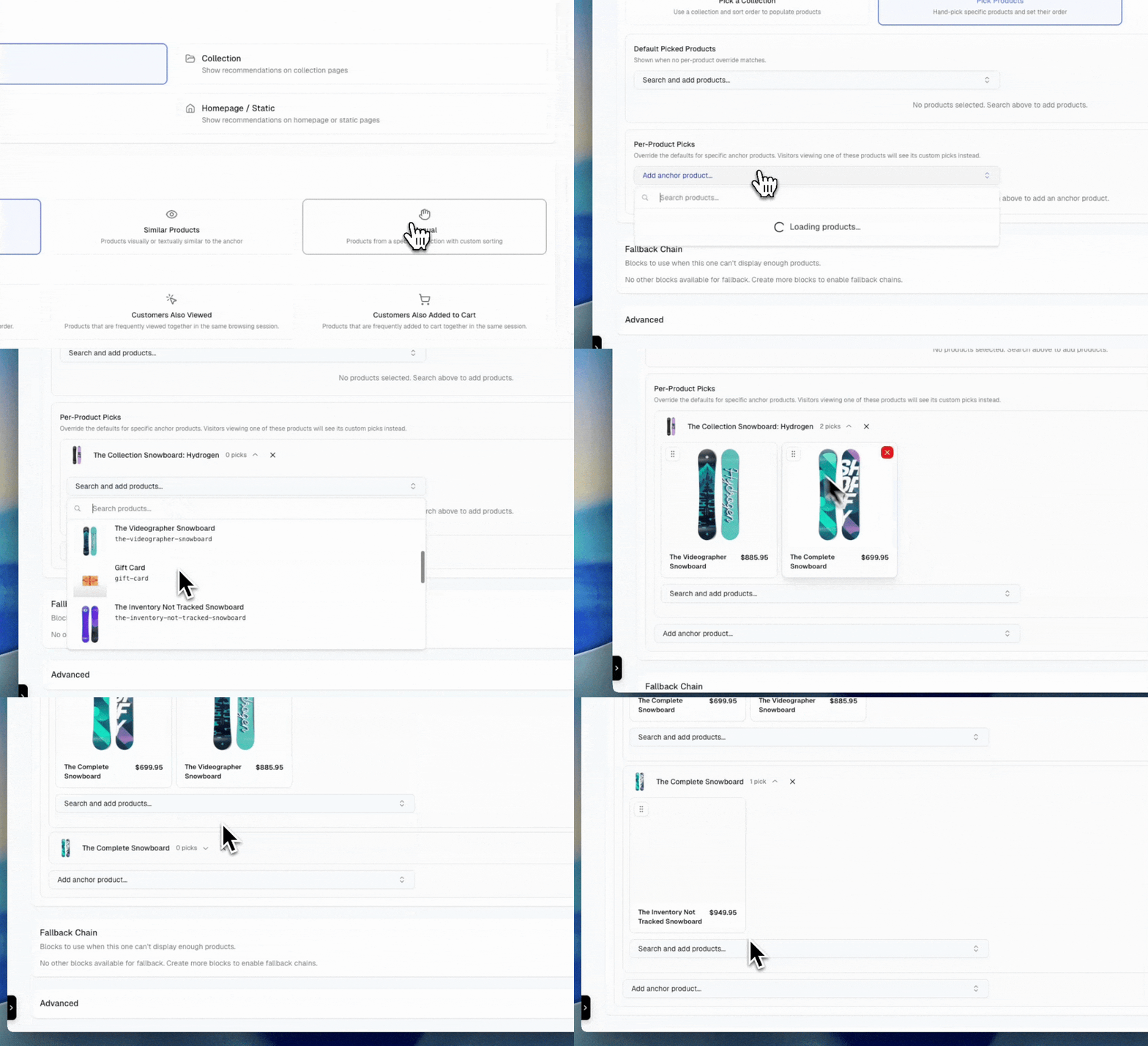
- Hand-picked products: Select specific products by ID in the dashboard. The display order matches the order you define. When hand-picked product IDs are configured, they take priority over collection-based selection. You can also pin a specific variant for each hand-picked product; see pin a variant.
- Per-anchor product picks: For product-anchored blocks, you can hand-pick different recommendations for specific anchor products. When a customer views a product that has anchor-specific picks configured, those picks are returned instead of the default list. If no anchor-specific picks exist for the current product, the block falls back to the default hand-picked products.
- Collection-sourced products: Collection-anchored blocks use the collection supplied as the anchor. For every other anchor type, select a collection for the block. Layers rejects a collection-sourced manual block without a collection.
- Optionally apply a sort order for custom sorting
- Apply merchandising rules: For collection-sourced blocks, toggle on to inherit the collection’s merchandising rule pins and banners. Off by default.
Apply merchandising rules
By default, manual blocks that pull products from a collection skip the collection’s merchandising rules. You get the raw collection contents in the configured sort order, without the pins, banners, or other rule effects that would normally apply on the collection page. Enable Apply merchandising rules when you want a collection-sourced block to behave like the collection itself:- Pinned products surface at the top of the block, matching their pinned positions on the collection page.
- Banners configured on the collection’s merchandising rule are returned alongside the products.
- Other rule effects (for example, sell-out deletion) apply to the block’s results.
The Apply merchandising rules toggle applies only to manual blocks whose products come from a collection. Hand-picked product IDs are unaffected. Merchandising rules are never applied to explicitly picked products.
Pin a variant on a hand-picked product
Each hand-picked product in a manual block can show a specific variant instead of the default one. Use this when a picked product should lead with a particular option, such as a seasonal color or a best-selling size.- In the block editor, hand-pick a product as usual.
- On the product’s card, open the variant dropdown (it shows Default variant until you change it).
- Select the variant to feature.
Per-anchor product picks
Per-anchor product picks let you tailor manual block recommendations based on which product a customer is viewing. Instead of showing the same hand-picked products for every anchor, you can define unique product lists for specific anchors. How it works:- You configure a default set of hand-picked products for the block
- Optionally, you add per-anchor overrides for specific products
- When the block is requested with an
anchor_id:- If the anchor has specific picks configured, those products are returned
- Otherwise, the default hand-picked products are returned
- “Best Sellers” block (collection of top products, sorted by sales)
- “New Arrivals” block (collection of recent products, sorted by date)
- “Editor’s Picks” (curated collection with custom order)
- “Staff Picks” (hand-picked products in a specific order)
- Seasonal promotions (collection of seasonal products)
- “Complete the Look” with product-specific accessory pairings
- Targeted cross-sells that vary by anchor product
Metafield reference strategy
Serve the products a merchant authored in a reference metafield on the anchor product: relationships that already live in Shopify, like “wear it with”, “refills for this”, or “pairs well with”. Layers reads the metafield’s referenced products at request time. The block always reflects what’s currently authored in the Shopify admin, with no duplicate curation in the dashboard. Supported anchors: Product Supported metafield types:product_reference, list.product_reference, variant_reference, and list.variant_reference. Collection reference metafields are not supported.
Configuration:
Select the source metafield in the block editor’s Reference Metafield card. The picker lists the reference metafield definitions on your store, each tagged with its owner scope (Product or Variant), so you always select a definition that exists. Set the scope to Variant to read the metafield from the variant the shopper is viewing instead of the product.
How it works:
- Products appear in the exact order they’re authored in the metafield. Nothing re-ranks them.
- The block applies the same eligibility rules as a manual block. It skips products that are deleted, disabled for blocks, unpublished on the request’s channel, outside the request’s B2B catalog, hidden by your combined listings display setting, unavailable in the request’s market, or out of stock (when hide out-of-stock is on).
- The block’s matching rules, exclusions, safeguards, and pagination all apply as usual.
- If the anchor product has no value for the metafield, or none of the referenced products are eligible, the block returns empty and defers to its fallback chain.
variant_id on the Blocks API request. When the variant has no value for the metafield, the block falls back to the anchor product’s product-scoped value.
Variant references keep their variant:
When the metafield references variants rather than products, Layers recommends each referenced variant’s product in authored order. The referenced variant surfaces as the product’s matched variant in the first_or_matched_variant response attribute. Layers skips a referenced variant that’s unpublished, B2B-only on a retail request, or out of stock, using the same availability rules as search; another eligible referenced variant of the same product can still contribute it. Product references don’t name a variant, so normal variant selection applies.
Use cases:
- “Wear it with” outfit pairings authored by your merchandising team in Shopify
- “Refills for this” or “Replacement parts” rails driven by existing product relationships
- Any cross-sell relationship you already maintain in reference metafields
Sequenced products strategy
Serve the other members of the anchor product’s sequence, in sequence order. If you’ve authored sequences (outfits, lookbooks, coordinated sets), the block returns the companions for whichever product the shopper is viewing, with no duplicate curation. Supported anchors: Product How it works:- Layers resolves the anchor product’s sequence group at request time and returns the other members in the order you defined. The block always reflects the current sequence. Editing or reordering a group takes effect immediately, with no recomputation delay.
- The anchor product itself is never included in the results.
- Inactive sequence members are skipped, so unpublished or disabled products don’t appear.
- The block applies the same eligibility rules as a manual block, and the block’s matching rules, exclusions, safeguards, and pagination all apply as usual.
- A block can optionally be configured to use a sequence scoped to a specific collection instead of the all-collections sequence. See Collection scope.
- If the anchor product doesn’t belong to an active sequence, the block returns empty and defers to its fallback chain.
- “Complete the look” rails driven by sequences you already maintain for collection browsing
- Outfit or set companions on product pages, in authored order
Set strategies
Serve the companion products your own photography already shows. Layers runs your product images through garment detection, identifies the other items styled in each shot, and matches them back to products in your catalog. The result is a “shop the look” set grounded in styling decisions your team made at the shoot, not in behavioral or visual similarity.Photographed Together
Photographed Together is currently in beta. The strategy appears in the block editor’s strategy selector only for stores with image detection enabled. Contact Layers support to enable it for your store.
- Layers detects the individual garments in each product’s images and matches every companion garment to a product in your catalog, with a confidence score. Layers discards weak matches below the confidence threshold.
- Matching respects what the photograph shows. A companion only matches catalog products in the detected garment’s category. When the detected garment has a color, Layers prefers a candidate whose variant options name that color. The preference only applies within a small similarity band of the top-scoring candidate. Olive shorts still favor the olive colorway when it’s a close match. A clearly better product wins over a same-color one that’s a weaker match. When no candidate names the color, or the closest color match is outside the band, Layers falls back to the most similar candidate.
- Color agreement is read from variant options only (for example, a
Coloroption whose value contains the wordolive). Product titles and variant titles aren’t consulted. - The set for an anchor product combines both directions: companions detected in the anchor’s own photography, and products whose photography features the anchor.
- When a companion match resolves to a specific variant on color, Layers pins that variant as the product’s
first_or_matched_variantin the response. The storefront can then show the exact colorway the photograph shows. Without a color match, the product’s default variant is used. - Results are sorted by match confidence, deduplicated by product, and capped per anchor so a heavily photographed hero piece doesn’t fill every other product’s set. The cap counts only eligible companions. A detected match that is unpublished on the shopper’s channel, disabled for blocks, or excluded by the block’s rules doesn’t use up a slot. The next eligible match takes its place.
- Matches are refreshed periodically, so a catalog that has since gained the right product picks it up on the next pass.
- Replacing a product’s photography doesn’t break the set. Layers retires matches built from the old image and rebuilds them from the new shots on the next refresh. Matches from the product’s other images keep serving in the meantime.
variant_id on the Blocks API request. When that variant has photography of its own, the set is built from those shots, so shoppers on a specific colorway see the items it was styled with. Variants without their own photography fall back to the product’s other images.
Eligibility and rules:
- The block’s matching rules, exclusions, and safeguards apply as usual. An
apply_filterrule drops members before pagination and totals. - With Hide out of stock enabled, an unavailable pinned variant drops the pin, not the product. The garment the photograph shows stays in the set with its normal available variant. Availability follows the same search rules under a narrowed inventory location scope. A pinned variant that Shopify keeps selling when out of stock, or whose inventory is untracked, keeps its pin.
- While detection and matching are still running for your catalog, the block returns the same “data is being computed” state as other precomputed strategies and defers to its fallback chain. In the dashboard, the block shows a training badge in the blocks list and a notice on its edit page. Both appear from the moment you publish the block until the first detection pass completes.
- A first pass with some photos still unprocessed doesn’t hold the block back. The block goes live with the matches it has, and Layers completes the remaining matches on later passes.
- “Shop the look” rails on product pages
- “Complete the set” cross-sells grounded in your own styling
- Outfit-driven merchandising without manual curation
Related content strategy
Recommend blog articles or pages instead of products. The related content strategy (related_content) is the only strategy with a content result type: the block’s results array contains articles or pages rather than products.
Related Reading
Articles and pages related to the current product, cart, or article. Supported anchors: Product, Cart, Article How it works:- On product anchors, Layers seeds the search from the anchor product. On cart anchors, it uses every product in the cart to find related content.
- On article anchors, Layers seeds the search from the current article’s content and excludes the article itself from the results.
- Results are ranked by semantic similarity and deduplicated. Each item includes the content’s title, handle, summary, author, tags, image, publish date, blog title, and URL.
- “Related reading” rails on product pages that link to buying guides
- “Keep reading” rails under blog posts
- Care guides or sizing pages surfaced from the cart
Personalized strategies
Personalized strategies resolve per request against the current shopper’s session and identity. They don’t precompute a product-to-product matrix. Instead, they pull products directly from the shopper’s own browsing, cart, order history, or replenishment cadence. If the shopper has no relevant session activity yet, the block defers to its fallback chain.Recently Viewed
Recently Viewed
Products the shopper has viewed recently in the current session, prioritizing items they revisited more than once.Supported anchors: Every anchor type except NoneConfiguration:
max_items caps how many products are returned (1–50, default 10). exclude_anchor removes the current anchor product from results (default true), so a product page rail never recommends the product the shopper is already viewing.Use cases:- “Pick up where you left off” rail on the home page
- Return-visit reminder on account or cart pages
Replenish
Replenish
Previously purchased products that are due to be repurchased based on typical replenishment cadence. See Replenish for how Layers decides a product is due.Supported anchors: Home, Cart, Product, OtherUse cases:
- “Time to reorder” rail for consumables and refills
- Account page nudge for known repeat-purchase items
Personalized strategies require shopper session context. For brand-new visitors with no session activity, the block returns empty and the fallback chain takes over, typically a trending strategy.
Replenish
The Replenish strategy recommends products a shopper has bought before and is due to buy again, such as coffee, skincare, supplements, or filters. It works entirely from the purchase history your storefront sends in the request’sproductsPurchased context. Layers doesn’t look up the shopper’s orders on its own.
Send purchase history:
Include one productsPurchased entry per past order line, with a timestamp on each:
productIdandatare required. Layers acceptsatas a Unix timestamp in seconds or milliseconds.- Layers ignores entries without a timestamp. A shopper with no timestamped entries gets no Replenish results, and the block defers to its fallback chain.
- Send
variantIdwhenever you know it. Layers returns the variant from the shopper’s most recent purchase of each product as the matched variant infirst_or_matched_variant. - Send the shopper’s full, cumulative history on every request, not just the latest order. Layers deduplicates repeated entries, so resending the same history is safe.
- Send a stable
customerIdfor logged-in shoppers, or a stablesessionIdfor guests. Layers uses these to learn store-wide repurchase intervals from repeat customers.
- Layers picks a repurchase interval for each purchased product, in this order:
- The shopper’s own cadence: the median gap between their purchases, when they’ve bought the product at least twice.
- The store-wide interval observed across repeat customers of the product, once at least
min_repeat_customerscustomers have repurchased it. - The shortest recurring selling plan interval on the product.
- Layers skips products with no interval from any of these sources.
- Layers divides the days since the last purchase by the interval to get a due ratio. A product is due when the ratio falls between
min_due_ratioandmax_due_ratio. With the defaults, a product with a 30-day interval becomes due at 24 days and drops out after 90 days. - Layers ranks due products by how close the ratio is to 1, then by how many times the shopper bought the product.
- On product anchors, Layers removes the anchor product.
- On cart anchors, Layers removes products already in
productsInCart. - The block’s excluded products and matching rules apply as usual.
- You can’t enable the exclude purchased products safeguard on a Replenish block. Layers rejects the save with a
422validation error.
20), Min due ratio (how soon a product becomes due, default 0.8), and Max due ratio (when a product is treated as abandoned, default 3.0). See Personalized configuration keys for limits.
Trending strategies
Show what’s popular across the store without needing a shopper or anchor product. Trending strategies suit top-of-funnel surfaces like the home page or 404 pages where you have no other context to work with.Best Sellers
Best Sellers
Trending and popular products based on overall store activity, sales, and shopper interest.Supported anchors: Product, Article, Collection, Cart, Home, Search, Not Found, Landing, OtherTime windows: 7d, 30dUse cases:
- “Best sellers” hero on the home page
- Default rail on search pages with no results
- Fallback content for 404 pages
Trending in Region
Trending in Region
Show the most popular items in the shopper’s geographic area using IP-derived location data.Supported anchors: Product, Article, Collection, Cart, Home, Search, Not Found, Landing, OtherTime windows: 7d, 30dUse cases:
- “Popular in your area” home page rail
- Region-aware landing pages and campaign destinations
Live Feed
Live Feed
Real-time updates on what’s happening in the store: newest products, trending items, and active promotions.Supported anchors: Product, Article, Collection, Cart, Home, Search, Not Found, Landing, OtherTime windows: 1h, 6h, 24hUse cases:
- “Just dropped” or “What’s hot right now” on the home page
- Live activity rail on landing pages during a launch or sale
Contextual strategies
Use signals from the page itself, such as the search query, traffic source, or cart total, to select products. Contextual strategies are aware of what brought the shopper to the page rather than who the shopper is.Searched Then Viewed
Searched Then Viewed
Help shoppers discover relevant products based on what others viewed after searching with the same query.Supported anchors: SearchUse cases:
- “Shoppers also viewed” rail on search results
- Recovery rail on zero-result search pages
Searched Then Purchased
Searched Then Purchased
Recommend products based on what shoppers bought after searching with the same query.Supported anchors: SearchUse cases:
- “Top picks for this search” rail
- Conversion-focused recommendations alongside search results
Landing Page Picks
Landing Page Picks
Recommend products tailored to the traffic source, reflecting browsing, carting, and buying patterns from similar channels.Supported anchors: LandingUse cases:
- Channel-aware hero rail on UTM-tagged landing pages
- Campaign destinations that adapt to paid vs. organic traffic
Free Shipping Picks
Free Shipping Picks
Surface products that nudge the cart toward the free-shipping threshold, related to current cart contents and within the remaining spend window.Supported anchors: CartRequires:
context.freeShippingThreshold on the request (and productsInCart[].price for any cart lines you include), both in the request currency’s major units (dollars, not cents). An empty cart is fine: the whole threshold is treated as the remaining gap and the block tops up from best sellers. The app embed doesn’t send the threshold, so pass it yourself. See Free Shipping Picks.Use cases:- “Add to qualify for free shipping” cart rail
- Threshold-aware upsell when the cart is close to a free-shipping break
Contextual strategies require the relevant page signal: a search query for
searched_then_viewed and searched_then_purchased, a landing source for landing_page_picks, or context.freeShippingThreshold for free_shipping_picks. When the signal isn’t available on the request, the block defers to its fallback chain.Free Shipping Picks
Free Shipping Picks recommends products that close the gap between the shopper’s cart subtotal and your free-shipping threshold. Use it on cart drawers and cart pages to show an “Add to qualify for free shipping” rail. Layers calculates the price window for each request:- Subtotal: the sum of
price×quantityfor each entry incontext.productsInCart. Entries without a validquantitycount as1. - Remaining:
freeShippingThresholdminus the subtotal. - Window: products with a variant priced from the remaining amount up to the remaining amount × (1 +
overshoot). With the defaultovershootof0.5and $20 remaining, picks are priced $20 to $30.
context:
freeShippingThreshold and each line’s price are in the request currency’s major units (e.g. 25.00 for $25), not cents. Shopify’s /cart.js and Liquid money values such as cart.total_price are in cents. Divide them by 100 before sending.
In this example, the subtotal is $50, so $25 remains. With the default overshoot, the block returns products priced $25 to $37.50.
Free Shipping Picks returns no primary results, and the block’s fallback chain decides what to show, in these cases:
- The request has no
freeShippingThreshold, or the value isn’t a number greater than0. - The cart subtotal already meets or exceeds the threshold.
freeShippingThreshold and cart price values in the same currency as the shopper’s resolved market. When Layers can’t resolve a market, it compares the window against your primary market prices. A threshold with an empty cart is valid. In that case the whole threshold is the remaining amount.
Strategy configuration keys
Use the following keys instrategy_config. Each strategy key accepts only the fields listed for its strategy type. The blocks-catalog tool returns the same schema live, including descriptions, required flags, and allowed values.
Interaction
Collection interaction
collection_interaction is accepted as an alias and normalized to interaction for collection anchors.
Interaction ordering
Interaction and collection interaction strategies accept an optionalorder_by key that controls which metric orders the results:
In the block editor’s strategy settings, set Order by to the metric you want. For example,
confidence_score ranks results by raw co-occurrence instead of the default lift.
Category backoff results always rank below the anchor’s own results, whichever metric you order by.
Trending
Contextual
free_shipping_picks accepts the following key instead of time_window:
Personalized
Onlyrecently_viewed and replenish accept configuration keys.
recently_viewed
replenish
The
replenish strategy key is only accepted on home, cart, product, and other anchors, including when a rule switches a block to it.
Manual
Metafield reference
Set
Related content
Similar products constraints
Manual anchor constraints apply to the base Similar Products strategy on Product and Collection anchors in the dashboard, and can be configured for Cart anchors through the API or MCP. Cart constraints use values from every product in the cart. Behavior-seeded variants and other strategies don’t accept them. See Anchor constraints for details.Prefer anchor option
Thesimilar_products, manual, metafield_reference, and set strategy types offer a Prefer anchor option setting in the block editor, disabled by default.
When enabled and the request includes a variant_id, the block ranks products matching the anchor variant’s selected options first. A shopper viewing a blue variant sees blue products at the top of the block. The setting is ranking-only: it never changes which products are returned, and pagination stays stable.
Requests without a variant_id are unaffected.
Validation
Each strategy key accepts only thetime_window values listed for it in Strategy configuration keys. Layers rejects other values when you save a block, with a message naming the allowed values. If a saved block has no time_window configured, the strategy’s default applies. Layers also rejects unknown configuration keys, and the validation message names the accepted keys for the selected strategy type. Use blocks-catalog when you need the current schema before creating or updating a block.