> ## Documentation Index
> Fetch the complete documentation index at: https://docs.uselayers.com/llms.txt
> Use this file to discover all available pages before exploring further.
# Strategies
> Reference for recommendation block strategies in Layers — interaction, similarity, manual, trending, and contextual types.
Strategies define how products are selected for a block. Each anchor type supports different strategies.
## Interaction strategies
Use behavioral data to find products that customers frequently interact with together. Interaction data is computed periodically based on historical events.
Products that are frequently purchased together in the same order.
**Supported anchors:** Product, Cart
**Use cases:**
* Product page: "Customers who bought this also bought..."
* Cart: "Complete your purchase with these items"
Products that are frequently viewed together in the same browsing session.
**Supported anchors:** Product
**Use cases:**
* Product page: "Customers also viewed these products"
* Browse abandonment recovery
Products that are frequently added to cart together in the same session.
**Supported anchors:** Product
**Use cases:**
* Product page: "Often added together"
* Cart optimization
Products that customers purchased after viewing a specific product in the same session. This strategy connects browsing behavior with purchase intent, surfacing products that shoppers who viewed the anchor product ultimately decided to buy.
**Supported anchors:** Product
**Use cases:**
* Product page: "Customers who viewed this ultimately bought..."
* Conversion-focused recommendations
* Identifying high-intent product pairings
Products that customers who bought a specific product also purchased across any of their orders. Unlike "Frequently Bought Together" (which looks at products in the same order), this strategy looks at a customer's entire purchase history to find broader buying patterns.
**Supported anchors:** Product, Cart
**Use cases:**
* Product page: "Customers who bought this also bought..."
* Long-term cross-sell recommendations
* Discovering complementary products across separate orders
Interaction strategies require sufficient historical data to generate meaningful recommendations. While strategy data is being computed, blocks using interaction strategies automatically return empty results and defer to their fallback chain. The API response includes a `_training` flag during this period.
## Collection interaction strategies
Use behavioral data to find products related to a collection based on how shoppers who browse that collection interact with products. Unlike product interaction strategies (which find product-to-product relationships), collection interaction strategies compute collection-to-product relationships.
Products frequently purchased by shoppers who browsed the collection.
**Supported anchors:** Collection
**Use cases:**
* Collection page: "Popular purchases from this collection"
* Cross-sell products based on collection browsing behavior
Products frequently viewed by shoppers who browsed the collection.
**Supported anchors:** Collection
**Use cases:**
* Collection page: "Shoppers also viewed these products"
* Discover products related to a collection through browsing patterns
Products currently trending within the collection based on recent activity.
**Supported anchors:** Collection
**Use cases:**
* Collection page: "Trending now"
* Surface popular products within a specific collection
Collection interaction strategies require sufficient historical browsing and interaction data. Data is computed periodically based on configured time windows (7d, 30d, 90d).
## Similar products strategy
Use vector similarity to find products that are visually and semantically similar to the anchor product.
**Supported anchors:** Product, Collection
**How it works:**
The system generates embeddings for each product based on product images, titles, descriptions, and attributes. It then runs the full ranking pipeline — combining vector similarity with behavioral signals — and stores the top results for each product in a precomputed cache. When a customer views a product, the block serves results directly from this cache for fast response times. If no precomputed data exists yet (for example, for a newly added product), the system falls back to real-time vector search automatically.
For collection anchors, the system automatically selects a representative product from the collection to use as the similarity source.
**Precomputed results and freshness:**
* Results are recomputed daily when the existing data is more than three days old or new products have been added since the last run
* When a product's embeddings are updated (for example, after editing its title, description, or images), that product's similar products are recomputed incrementally
* All filters, facets, pagination, and sort orders continue to work as expected on precomputed results
* No configuration is required — precomputed caching is enabled automatically for stores with active similar products blocks
**Use cases:**
* "Similar Products" on product pages
* "You May Also Like" recommendations
* Visual discovery and exploration
* Collection-based similarity recommendations
## Manual strategy
Curate products using a collection or hand-picked product IDs, with optional custom sorting. This strategy gives you complete control over which products appear in the block.
**Supported anchors:** Product, Collection, Cart, None
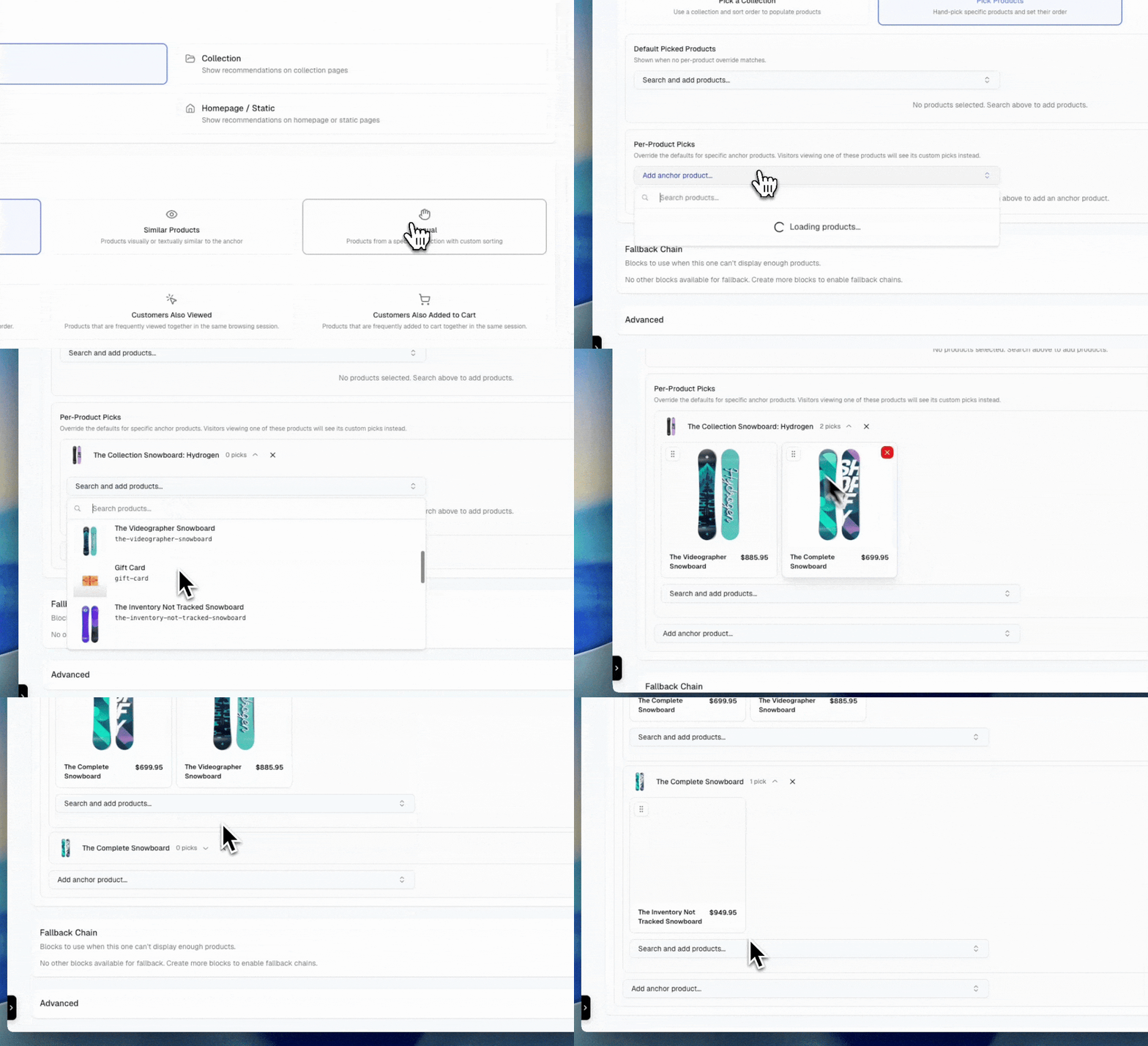
The example below shows selecting the manual strategy when you want to hand-pick which products appear in a block.
 **Configuration:**
* **Hand-picked products**: Select specific products by ID in the dashboard. The display order matches the order you define. When hand-picked product IDs are configured, they take priority over collection-based selection.
* **Per-anchor product picks**: For product-anchored blocks, you can hand-pick different recommendations for specific anchor products. When a customer views a product that has anchor-specific picks configured, those picks are returned instead of the default list. If no anchor-specific picks exist for the current product, the block falls back to the default hand-picked products.
* **Collection anchor blocks**: The collection is determined dynamically from the API request's `anchor_id` parameter (no collection selection needed in dashboard)
* **None anchor blocks**: Select a collection to pull products from in the dashboard
* Optionally apply a sort order for custom sorting
### Per-anchor product picks
Per-anchor product picks let you tailor manual block recommendations based on which product a customer is viewing. Instead of showing the same hand-picked products for every anchor, you can define unique product lists for specific anchors.
**How it works:**
1. You configure a default set of hand-picked products for the block
2. Optionally, you add per-anchor overrides for specific products
3. When the block is requested with an `anchor_id`:
* If the anchor has specific picks configured, those products are returned
* Otherwise, the default hand-picked products are returned
This is useful when certain products have natural pairings that differ from your general recommendations. For example, a "Complete the Look" block might show different accessories depending on which clothing item a customer is viewing.
**Use cases:**
* "Best Sellers" block (collection of top products, sorted by sales)
* "New Arrivals" block (collection of recent products, sorted by date)
* "Editor's Picks" (curated collection with custom order)
* "Staff Picks" (hand-picked products in a specific order)
* Seasonal promotions (collection of seasonal products)
* "Complete the Look" with product-specific accessory pairings
* Targeted cross-sells that vary by anchor product
## Trending strategies
Show what's popular across the store without needing a shopper or anchor product. Trending strategies are ideal for top-of-funnel surfaces like the home page or 404 pages where you have no other context to work with.
Trending and popular products based on overall store activity, sales, and shopper interest.
**Supported anchors:** Product, Collection, Cart, Home, Search, Not Found, Landing, Other
**Time windows:** 7d, 30d
**Use cases:**
* "Best sellers" hero on the home page
* Default rail on search pages with no results
* Fallback content for 404 pages
Showcase the most popular items in the shopper's geographic area using IP-derived location data.
**Supported anchors:** Product, Collection, Cart, Home, Search, Not Found, Landing, Other
**Time windows:** 7d, 30d
**Use cases:**
* "Popular in your area" home page rail
* Region-aware landing pages and campaign destinations
Real-time updates on what's happening in the store — newest products, trending items, and active promotions.
**Supported anchors:** Product, Collection, Cart, Home, Search, Not Found, Landing, Other
**Time windows:** 1h, 24h
**Use cases:**
* "Just dropped" or "What's hot right now" on the home page
* Live activity rail on landing pages during a launch or sale
## Contextual strategies
Use signals from the page itself — the search query, the traffic source, or the cart total — to select products. Contextual strategies are aware of what brought the shopper to the page rather than who the shopper is.
Help shoppers discover relevant products based on what others viewed after searching with the same query.
**Supported anchors:** Search
**Use cases:**
* "Shoppers also viewed" rail on search results
* Recovery rail on zero-result search pages
Recommend products based on what shoppers bought after searching with the same query.
**Supported anchors:** Search
**Use cases:**
* "Top picks for this search" rail
* Conversion-focused recommendations alongside search results
Recommend products tailored to the traffic source, reflecting browsing, carting, and buying patterns from similar channels.
**Supported anchors:** Landing
**Use cases:**
* Channel-aware hero rail on UTM-tagged landing pages
* Campaign destinations that adapt to paid vs. organic traffic
Surface products that nudge the cart toward the free-shipping threshold, related to current cart contents and within the remaining spend window.
**Supported anchors:** Cart
**Use cases:**
* "Add to qualify for free shipping" cart rail
* Threshold-aware upsell when the cart is close to a free-shipping break
Contextual strategies require the relevant page signal — a search query for `searched_then_viewed` and `searched_then_purchased`, a landing source for `landing_page_picks`, or cart contents for `free_shipping_picks`. When the signal isn't available on the request, the block defers to its [fallback chain](/platform/blocks/fallback-chains).
## Strategy availability by anchor type
Not all strategies are available for all anchor types. Use this matrix to plan which strategy to pick for the surface you're building.
| Strategy | Product | Collection | Cart | Home | Search | Not Found | Landing | Other | None |
| -------------------------------- | ------- | ---------- | ---- | ---- | ------ | --------- | ------- | ----- | ---- |
| Frequently Bought Together | ✓ | ✗ | ✓ | ✗ | ✗ | ✗ | ✗ | ✗ | ✗ |
| Customers Also Viewed | ✓ | ✗ | ✗ | ✗ | ✗ | ✗ | ✗ | ✗ | ✗ |
| Customers Also Added to Cart | ✓ | ✗ | ✗ | ✗ | ✗ | ✗ | ✗ | ✗ | ✗ |
| Viewed Then Bought | ✓ | ✗ | ✗ | ✗ | ✗ | ✗ | ✗ | ✗ | ✗ |
| Customers Who Bought Also Bought | ✓ | ✗ | ✓ | ✗ | ✗ | ✗ | ✗ | ✗ | ✗ |
| Browsed Then Bought | ✗ | ✓ | ✗ | ✗ | ✗ | ✗ | ✗ | ✗ | ✗ |
| Browsed Then Viewed | ✗ | ✓ | ✗ | ✗ | ✗ | ✗ | ✗ | ✗ | ✗ |
| Trending in Collection | ✗ | ✓ | ✗ | ✗ | ✗ | ✗ | ✗ | ✗ | ✗ |
| Similar Products | ✓ | ✓ | ✗ | ✗ | ✗ | ✗ | ✗ | ✗ | ✗ |
| Trending (any) | ✓ | ✓ | ✓ | ✓ | ✓ | ✓ | ✓ | ✓ | ✗ |
| Searched Then Viewed | ✗ | ✗ | ✗ | ✗ | ✓ | ✗ | ✗ | ✗ | ✗ |
| Searched Then Purchased | ✗ | ✗ | ✗ | ✗ | ✓ | ✗ | ✗ | ✗ | ✗ |
| Landing Page Picks | ✗ | ✗ | ✗ | ✗ | ✗ | ✗ | ✓ | ✗ | ✗ |
| Free Shipping Picks | ✗ | ✗ | ✓ | ✗ | ✗ | ✗ | ✗ | ✗ | ✗ |
| Manual | ✓ | ✓ | ✓ | ✓ | ✓ | ✓ | ✓ | ✓ | ✓ |
**Configuration:**
* **Hand-picked products**: Select specific products by ID in the dashboard. The display order matches the order you define. When hand-picked product IDs are configured, they take priority over collection-based selection.
* **Per-anchor product picks**: For product-anchored blocks, you can hand-pick different recommendations for specific anchor products. When a customer views a product that has anchor-specific picks configured, those picks are returned instead of the default list. If no anchor-specific picks exist for the current product, the block falls back to the default hand-picked products.
* **Collection anchor blocks**: The collection is determined dynamically from the API request's `anchor_id` parameter (no collection selection needed in dashboard)
* **None anchor blocks**: Select a collection to pull products from in the dashboard
* Optionally apply a sort order for custom sorting
### Per-anchor product picks
Per-anchor product picks let you tailor manual block recommendations based on which product a customer is viewing. Instead of showing the same hand-picked products for every anchor, you can define unique product lists for specific anchors.
**How it works:**
1. You configure a default set of hand-picked products for the block
2. Optionally, you add per-anchor overrides for specific products
3. When the block is requested with an `anchor_id`:
* If the anchor has specific picks configured, those products are returned
* Otherwise, the default hand-picked products are returned
This is useful when certain products have natural pairings that differ from your general recommendations. For example, a "Complete the Look" block might show different accessories depending on which clothing item a customer is viewing.
**Use cases:**
* "Best Sellers" block (collection of top products, sorted by sales)
* "New Arrivals" block (collection of recent products, sorted by date)
* "Editor's Picks" (curated collection with custom order)
* "Staff Picks" (hand-picked products in a specific order)
* Seasonal promotions (collection of seasonal products)
* "Complete the Look" with product-specific accessory pairings
* Targeted cross-sells that vary by anchor product
## Trending strategies
Show what's popular across the store without needing a shopper or anchor product. Trending strategies are ideal for top-of-funnel surfaces like the home page or 404 pages where you have no other context to work with.
Trending and popular products based on overall store activity, sales, and shopper interest.
**Supported anchors:** Product, Collection, Cart, Home, Search, Not Found, Landing, Other
**Time windows:** 7d, 30d
**Use cases:**
* "Best sellers" hero on the home page
* Default rail on search pages with no results
* Fallback content for 404 pages
Showcase the most popular items in the shopper's geographic area using IP-derived location data.
**Supported anchors:** Product, Collection, Cart, Home, Search, Not Found, Landing, Other
**Time windows:** 7d, 30d
**Use cases:**
* "Popular in your area" home page rail
* Region-aware landing pages and campaign destinations
Real-time updates on what's happening in the store — newest products, trending items, and active promotions.
**Supported anchors:** Product, Collection, Cart, Home, Search, Not Found, Landing, Other
**Time windows:** 1h, 24h
**Use cases:**
* "Just dropped" or "What's hot right now" on the home page
* Live activity rail on landing pages during a launch or sale
## Contextual strategies
Use signals from the page itself — the search query, the traffic source, or the cart total — to select products. Contextual strategies are aware of what brought the shopper to the page rather than who the shopper is.
Help shoppers discover relevant products based on what others viewed after searching with the same query.
**Supported anchors:** Search
**Use cases:**
* "Shoppers also viewed" rail on search results
* Recovery rail on zero-result search pages
Recommend products based on what shoppers bought after searching with the same query.
**Supported anchors:** Search
**Use cases:**
* "Top picks for this search" rail
* Conversion-focused recommendations alongside search results
Recommend products tailored to the traffic source, reflecting browsing, carting, and buying patterns from similar channels.
**Supported anchors:** Landing
**Use cases:**
* Channel-aware hero rail on UTM-tagged landing pages
* Campaign destinations that adapt to paid vs. organic traffic
Surface products that nudge the cart toward the free-shipping threshold, related to current cart contents and within the remaining spend window.
**Supported anchors:** Cart
**Use cases:**
* "Add to qualify for free shipping" cart rail
* Threshold-aware upsell when the cart is close to a free-shipping break
Contextual strategies require the relevant page signal — a search query for `searched_then_viewed` and `searched_then_purchased`, a landing source for `landing_page_picks`, or cart contents for `free_shipping_picks`. When the signal isn't available on the request, the block defers to its [fallback chain](/platform/blocks/fallback-chains).
## Strategy availability by anchor type
Not all strategies are available for all anchor types. Use this matrix to plan which strategy to pick for the surface you're building.
| Strategy | Product | Collection | Cart | Home | Search | Not Found | Landing | Other | None |
| -------------------------------- | ------- | ---------- | ---- | ---- | ------ | --------- | ------- | ----- | ---- |
| Frequently Bought Together | ✓ | ✗ | ✓ | ✗ | ✗ | ✗ | ✗ | ✗ | ✗ |
| Customers Also Viewed | ✓ | ✗ | ✗ | ✗ | ✗ | ✗ | ✗ | ✗ | ✗ |
| Customers Also Added to Cart | ✓ | ✗ | ✗ | ✗ | ✗ | ✗ | ✗ | ✗ | ✗ |
| Viewed Then Bought | ✓ | ✗ | ✗ | ✗ | ✗ | ✗ | ✗ | ✗ | ✗ |
| Customers Who Bought Also Bought | ✓ | ✗ | ✓ | ✗ | ✗ | ✗ | ✗ | ✗ | ✗ |
| Browsed Then Bought | ✗ | ✓ | ✗ | ✗ | ✗ | ✗ | ✗ | ✗ | ✗ |
| Browsed Then Viewed | ✗ | ✓ | ✗ | ✗ | ✗ | ✗ | ✗ | ✗ | ✗ |
| Trending in Collection | ✗ | ✓ | ✗ | ✗ | ✗ | ✗ | ✗ | ✗ | ✗ |
| Similar Products | ✓ | ✓ | ✗ | ✗ | ✗ | ✗ | ✗ | ✗ | ✗ |
| Trending (any) | ✓ | ✓ | ✓ | ✓ | ✓ | ✓ | ✓ | ✓ | ✗ |
| Searched Then Viewed | ✗ | ✗ | ✗ | ✗ | ✓ | ✗ | ✗ | ✗ | ✗ |
| Searched Then Purchased | ✗ | ✗ | ✗ | ✗ | ✓ | ✗ | ✗ | ✗ | ✗ |
| Landing Page Picks | ✗ | ✗ | ✗ | ✗ | ✗ | ✗ | ✓ | ✗ | ✗ |
| Free Shipping Picks | ✗ | ✗ | ✓ | ✗ | ✗ | ✗ | ✗ | ✗ | ✗ |
| Manual | ✓ | ✓ | ✓ | ✓ | ✓ | ✓ | ✓ | ✓ | ✓ |